CY HX-U3-079-LE-HX Dual Usb Female Motherboard Pin Box Slot 3.0 20/19 Header Adapte
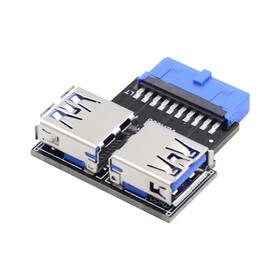
( Brand: Cy ), ( Manufacturer Part Number: HX-U3-079-LE-HX ), ( Part Type: Box Adapter ), ( Power Plug Type: No Plug ), ( Connector Type: Type-a Usb3.0 Female To 19/20pin Header, Type-a Usb3.0 Female ), ( Current Rating: 1.0 ), ( Finish Type: Matte ), ( Style: Horizontal Type ), ( Color: Black ), ( Compatible Devices: Motherboard Desktop Ssd Phone ), ( Material: Copper ), ( Package Dimensions Lxwxh: 4.37x3.66x1.69 Inches ), ( Weight: 0.02 Pounds )
Review CY Dual Usb 3.0 Type Female To Motherboard 20/19 Pin Box Header Slot Adapte
The **CY HX-U3-079-LE-HX Dual USB 3.0 Female Motherboard Header Adapter** is a precision-engineered solution designed to bridge the gap between a motherboard s internal USB 3.0 header and external connectivity needs, offering both versatility and reliability for modern computing setups. This adapter is specifically crafted to accommodate the **20-pin (Type-A) and 19-pin (Type-B) USB 3.0 female headers** commonly found on high-end motherboards, ensuring seamless compatibility with a wide range of devices. Constructed from high-quality, durable materials, it features robust metal contacts that guarantee a stable and interference-free connection, reducing the risk of signal degradation or loose connections that can compromise data transfer speeds or device functionality. The dual-header design allows users to expand their system s connectivity options without the need for additional cables or complex wiring, making it an ideal choice for DIY enthusiasts, system integrators, and professionals working in environments where clean, organized, and efficient cable management is critical.
What sets this adapter apart is its **low-profile yet sturdy build**, which ensures it fits snugly within tight spaces while maintaining structural integrity. The female connectors are meticulously aligned to match the pinout of standard USB 3.0 headers, supporting data transfer rates up to **5 Gbps**, making it perfect for high-speed peripherals like SSDs, external GPUs, or high-resolution displays. The adapter s compact yet functional design also minimizes clutter on the motherboard, allowing for better airflow and reducing thermal throttling in densely populated builds. Whether used for upgrading an existing system, building a custom PC, or troubleshooting connectivity issues, this adapter provides a reliable, no-fuss solution that enhances both performance and usability. Its universal compatibility ensures it works seamlessly with a variety of motherboard manufacturers, from budget-friendly to high-end gaming and workstation platforms, making it a versatile addition to any tech enthusiast s toolkit.
The **Cy HX-U3-079-LE-HX** is a dual USB 3.0 female-to-male header adapter designed to convert two 20-pin USB 3.0 headers into standard USB 3.0 ports. Below is a detailed breakdown of its pros and cons, followed by a conclusion and recommendation.
---
### **Pros**
1. **Dual USB 3.0 Ports**
The adapter provides two additional USB 3.0 ports, doubling the available USB connectivity on a motherboard. This is useful for high-speed peripherals like external SSDs, high-resolution cameras, or gaming controllers.
2. **High-Speed Data Transfer**
USB 3.0 (SuperSpeed) supports transfer speeds up to 5 Gbps, making it ideal for applications requiring fast data transfer, such as 4K video recording, large file transfers, or high-performance storage.
3. **Easy Installation**
The design is straightforward simply plug the adapter into the motherboard s 20-pin USB 3.0 headers (often labeled as "USB 3.0" or "SS" headers) and connect USB cables to the female ports. No soldering or complex wiring is required.
4. **Compatibility with Most Motherboards**
Many modern motherboards (especially those with multiple USB headers) include unused or spare USB 3.0 headers. This adapter allows users to repurpose these headers without modifying the motherboard.
5. **Compact and Low-Profile**
The adapter is small and fits neatly in most cases, making it suitable for builds where space is limited.
6. **No Power Draw**
Unlike some USB hubs, this adapter does not require additional power; it draws power directly from the motherboard s USB headers.
7. **Cost-Effective**
Compared to purchasing a motherboard with additional USB ports or a USB hub, this adapter is a budget-friendly solution for expanding USB connectivity.
8. **Supports USB 3.0 Features**
The adapter maintains all USB 3.0 features, including power delivery (up to 900 mA per port) and backward compatibility with USB 2.0 devices.
---
### **Cons**
1. **Limited to USB 3.0 Headers**
The adapter only works with motherboards that have **20-pin USB 3.0 headers** (not all motherboards have these). Some motherboards may use different pinouts (e.g., 19-pin headers for USB 2.0 or proprietary headers), making this adapter incompatible.
2. **No Power Delivery (PD) or Enhanced Power**
USB 3.0 ports on this adapter do not support **USB Power Delivery (PD)**, which is necessary for charging high-power devices like laptops or power banks. This limits its use for devices requiring more than 900 mA.
3. **No Overcurrent Protection**
Unlike some USB hubs, this adapter lacks built-in overcurrent or short-circuit protection. Connecting faulty or high-power devices could potentially damage the motherboard s USB controller.
4. **No USB Hub Management Features**
The adapter does not include features like USB passthrough, USB 3.1 Gen 2 support, or advanced power management, which some high-end USB hubs offer.
5. **Potential for Overheating (If Misused)**
While unlikely with standard usage, running multiple high-power devices simultaneously could stress the motherboard s USB ports, potentially leading to overheating.
6. **No USB-C or Alternative Connectors**
The adapter only provides **Type-A USB 3.0 ports**, meaning it cannot be used for USB-C devices unless an additional adapter is purchased.
7. **Quality and Durability Concerns**
Some users report that cheaper adapters may have flimsy construction or poor soldering, which could lead to loose connections or failure over time. The quality depends heavily on the specific model and brand.
8. **No Built-in USB 3.1 or Thunderbolt Support**
If you need **USB 3.1 Gen 2 (10 Gbps)** or Thunderbolt connectivity, this adapter will not suffice, as it is limited to USB 3.0.
---
### **Conclusion**
The **Cy HX-U3-079-LE-HX** is a **practical and affordable solution** for users who need to expand their motherboard s USB 3.0 connectivity without upgrading hardware. It is ideal for:
- Gamers who need extra USB ports for controllers or peripherals.
- Content creators requiring high-speed external storage.
- DIY enthusiasts looking to repurpose unused USB headers.
- Budget-conscious users who cannot afford a motherboard with more built-in USB ports.
However, it is **not suitable** for users who:- Need **USB Power Delivery (PD)** or high-power charging.
- Require **USB 3.1 Gen 2 or Thunderbolt** connectivity.
- Have motherboards with **non-standard USB headers** (e.g., 19-pin USB 2.0 headers).
- Need **overcurrent protection or advanced USB management**.
If your motherboard has compatible **20-pin USB 3.0 headers** and you primarily use standard USB 3.0 devices, this adapter is a **solid choice**. Otherwise, consider alternatives like a **USB hub with PD support** or a motherboard with more built-in USB ports.
---
### **Recommendation**
- **Buy this adapter if:**- Your motherboard has **two unused 20-pin USB 3.0 headers**.
- You only need **standard USB 3.0 ports** (not USB-C or PD).
- You are on a **tight budget** and want a simple, no-frills solution.
- **Avoid this adapter if:**- Your motherboard uses **19-pin or non-standard USB headers**.
- You need **USB Power Delivery (PD)** or high-power charging.
- You require **USB 3.1 Gen 2 or Thunderbolt** speeds.
- You prefer **built-in overcurrent protection** or advanced USB features.
For a more versatile solution, consider a **USB 3.0 hub with PD support** or a **motherboard with additional USB headers**. Always check your motherboard s manual to confirm header compatibility before purchasing.
Details:
Since the USB 3.0-A interface is compatible to its forerunners 2.0 and 1.1, you can still use your existing devices. An USB memory stick or USB-WLAN and the other device. Thus you can connect You can connect the 20pin header to internal usb 3.0 motherboard, then USB type A female external device.
part #: hxu3079le prices
- $13.54-$16.99
specifications coaxcabl:
- brand: Cy
- mpn: Hx-u3-079-le-hx
- part type: Box Adapter
- power plug type: No Plug
- connector type: Type-a Usb3.0 Female To 19/20pin Header, Type-a Usb3.0 Female
- current rating: 1.0
- finish type: Matte
- style: Horizontal Type
- color: Black
- compatible devices: Motherboard Desktop Ssd Phone
- material: Copper
- package dimensions lxwxh: 4.37x3.66x1.69 Inches
- weight: 0.02 Pounds
shipping coaxcabl:
- type: Fixed
- class: Expedited
- service: Expedited
- transit: 4-8 Days
- cost: $0.00
offer coaxcabl:
- options: Ship-to-home
- quantity: 2
- availability: In Stock
- sold: 0
- started: May 15, 2026
payments coaxcabl:
- other
- credit card: Discover
- wallet: Apple-pay
general coaxcabl:
- Radio Communication > Parts Accessories > Coax Cables Connectors
- condition: New
returns coaxcabl:
- poliCy: No Returns
seller coaxcabl:
- city: Lathrop, California
- rating: 100.0%
- # reviews: 2234
Cy HX-U3-079-LE Is Similar To:
- Chenyang Cy-uc-095 Usb 2.0 9pin Male To 3.1 Type E Keya Female Front Panel Socket Mainb (38.9% similar) When buyer has placed the order. The multi-layer PCB board integrates differential signal optimization technology to ensure stable transmission. Usb 2.0 9PIN male to 3.1 type e key-a female front panel socket ma inboard header extension adapter 1 the adapter is a converter convert the available ...(March 3rd, 2026)
